Every stage of an MEP contract,
in one system
From the tender to the final account, here's what Elevate does.
Elevate AI
Your In-System AI Assistant
Elevate AI is an AI chat assistant built into your system that does the heavy lifting for you. It has full access to your records, works to your approvals or within guardrails you set, and learns how you work.
Does the Heavy Lifting
Creates routines and records, and runs cashflow exercises for you.
Reads Specifications
Reads your specs and documents and finds the detail you need.
Messages & Emails
Sends reports to team members and sends emails for you.
Full Access to Records
Works across every record in Elevate, with nothing left out.
Approvals & Guardrails
Works to your approvals, or within guardrails you set.
Learns How You Work
Remembers your standards and gets better the more you use it.
Every hour the AI saves goes back into winning work. Calculate your saving
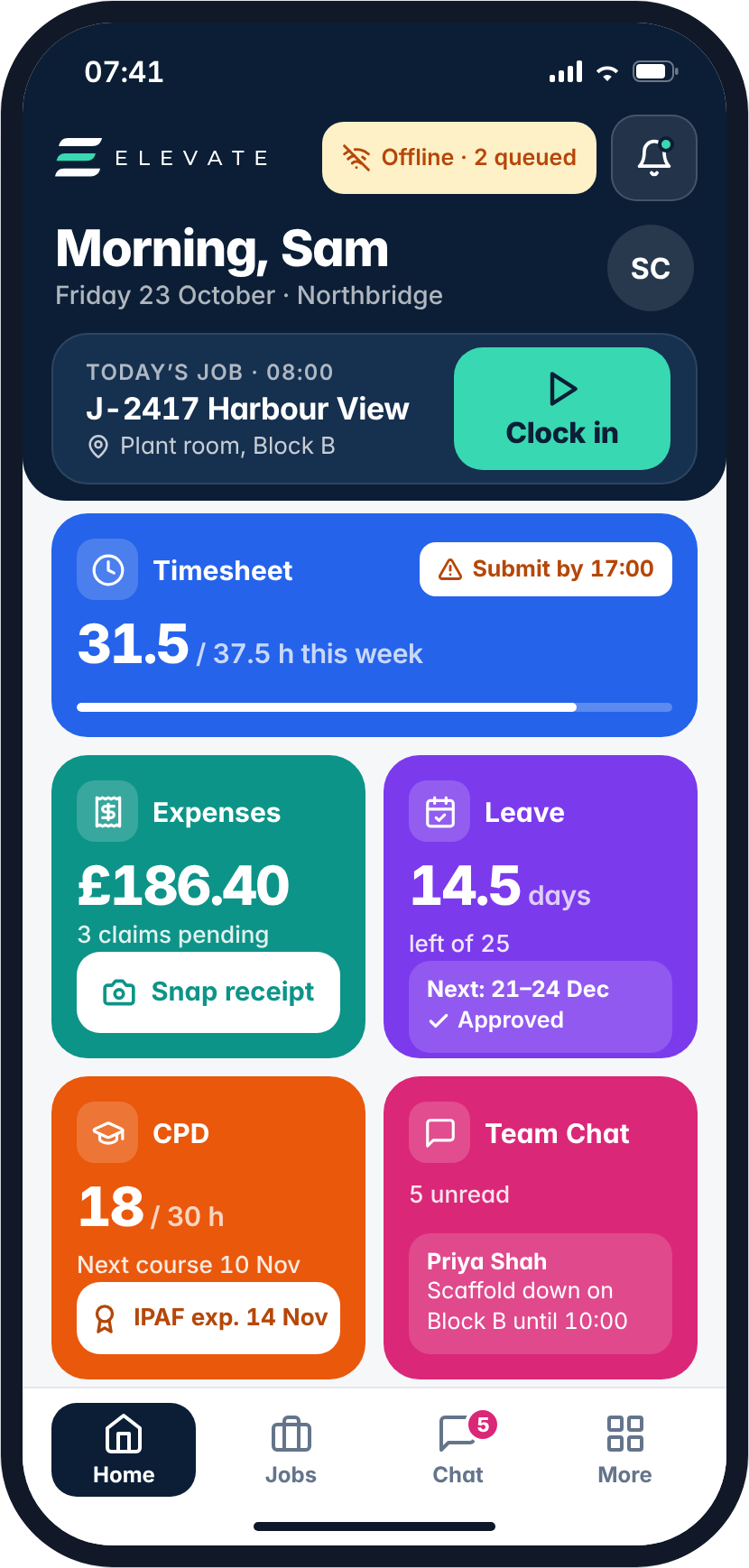
The Elevate mobile app
Everything your team needs on site, in their pocket. Works offline and syncs when back in signal.
Clock in and out of projects
Site teams clock on and off jobs in one tap, feeding live timesheets and labour costs straight into each project.
Adding expenses
Snap a receipt and submit the claim on the spot, coded to the right job and ready for approval.
Requesting leave
Check remaining holiday, request time off and see approvals without chasing the office.
Internal team chat
Message colleagues and project teams instantly, keeping site and office updates in one place.
CPD records
Track CPD hours, upcoming courses and certification expiry dates like IPAF and CSCS.
Leave &
Absence Tracking
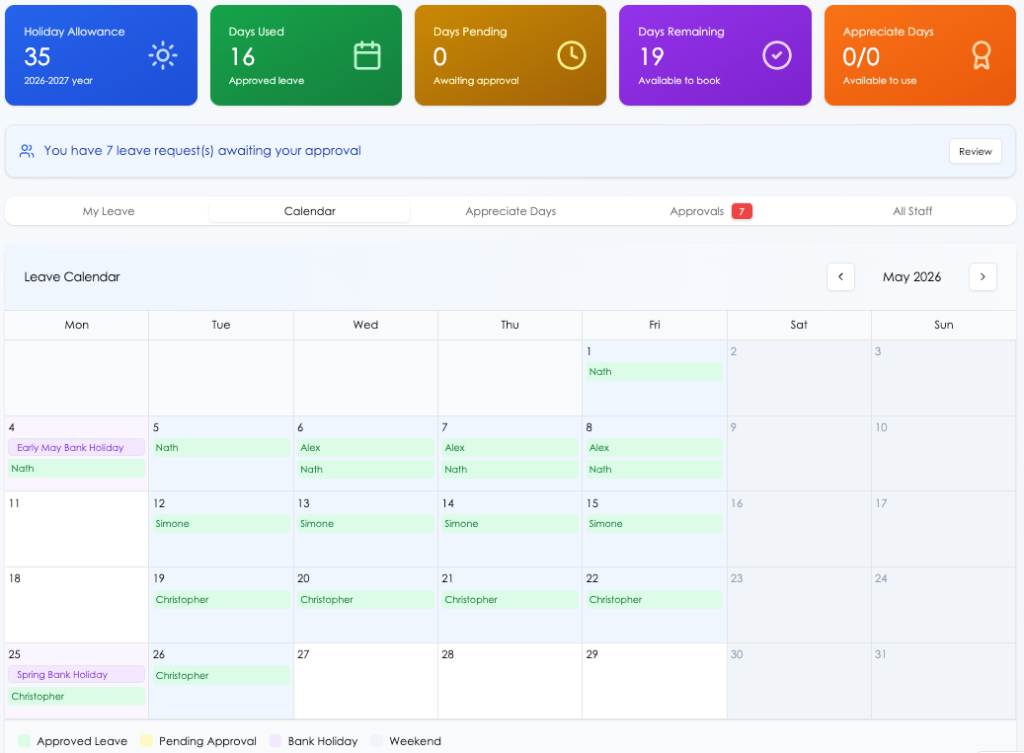
Manage holiday allowances, sickness, and unplanned absences across your entire workforce from one calendar view. Approve requests, monitor availability, and stay in control of your resource at all times.
Leave Calendar
Visualise approved leave, pending requests, and bank holidays across all staff in a clear monthly calendar view.
Allowance Management
Track each employee's holiday allowance, days used, days pending, and remaining balance for the leave year.
Approval Workflows
Managers are notified of leave requests and can approve or decline directly within the platform, with full audit history.
Subcontractor &
Supplier Reviews
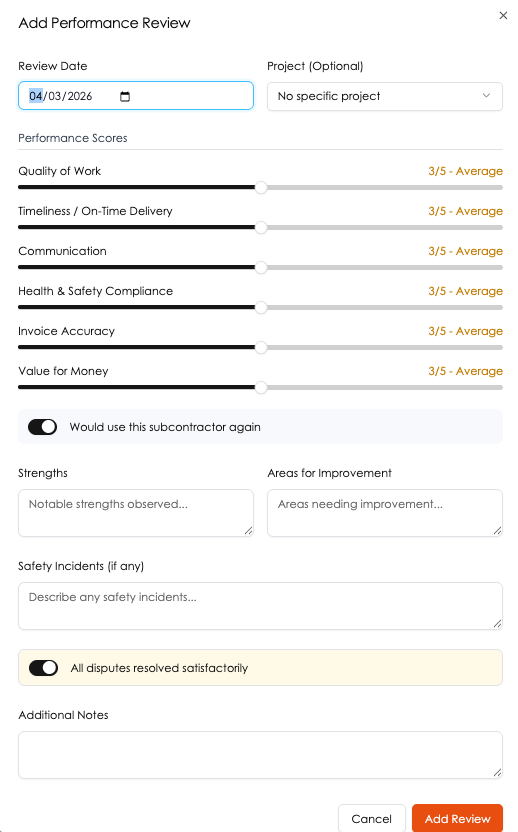
Score every subcontractor and supplier against the metrics that matter most to your business. Build a clear performance history that informs future procurement decisions and drives supply chain accountability.
Scored Performance Criteria
Rate quality of work, timeliness, communication, H&S compliance, invoice accuracy, and value for money on a 1–5 scale.
Project-Linked Reviews
Attach reviews to specific projects for a full picture of how each subcontractor performs across your portfolio.
Safety & Dispute Tracking
Log safety incidents and dispute outcomes against each review to maintain a compliant audit trail.
CPD Management
& Qualification Tracking
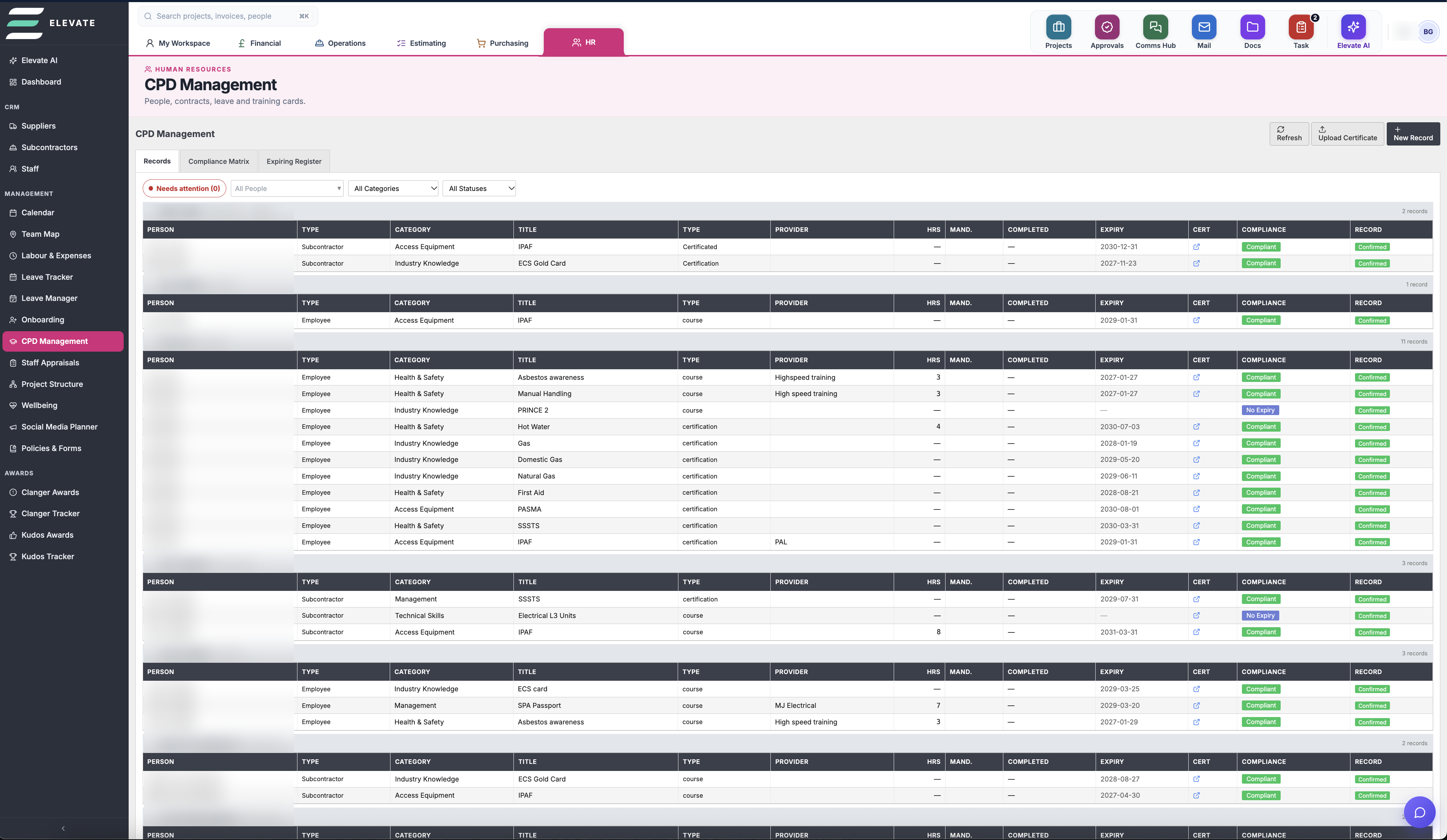
Keep on top of every employee and subcontractor qualification in one place. Track certifications, course completions, expiry dates, and CPD hours — with automated alerts before anything lapses.
Centralised Records
Log CPD activities, courses, and certifications for both staff and subcontractors across your entire business.
Expiry Alerts
Get notified before qualifications expire so you're never caught out on site with lapsed accreditations.
Category & Compliance Tracking
Organise records by category — Health & Safety, Technical Skills, Management — for audit-ready reporting.
Cost Code
Budget Management
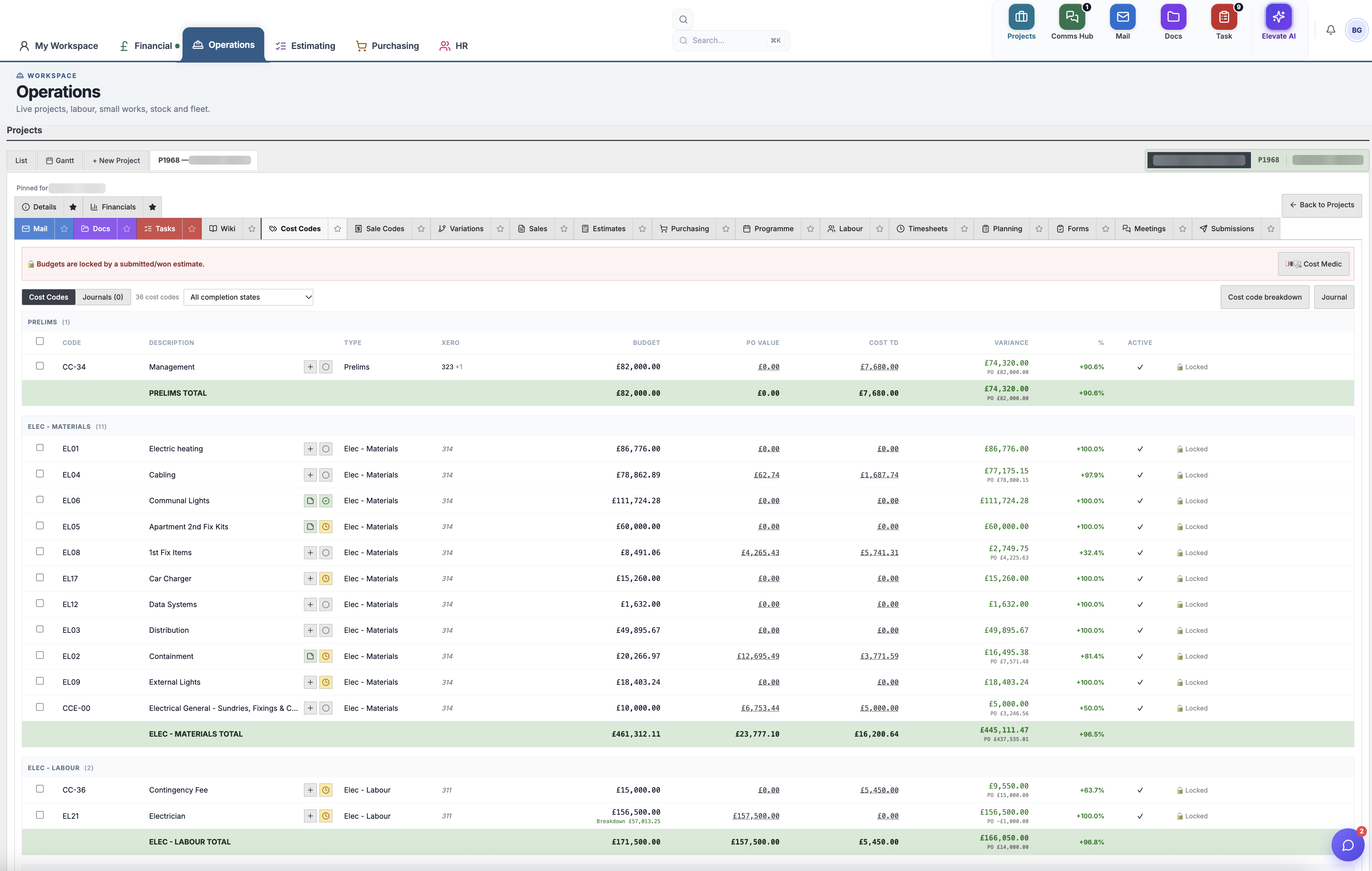
Each project has its own granular budget broken down by cost codes — from Electrical Labour to Data Gear and beyond. Track PO values, employee costs, stock costs, and remaining budget in real time with instant visibility of over and underspend.
Cost Code Structure
Organise project budgets into detailed cost codes by trade, section, or work package for precise tracking.
Live Cost vs Budget
Compare costs-to-date against budget at a glance, with colour-coded alerts for overspend across every line.
Full Cost Breakdown
Track PO values, employee costs, stock costs, and PO balances all within a single consolidated view.
OKRs
Module
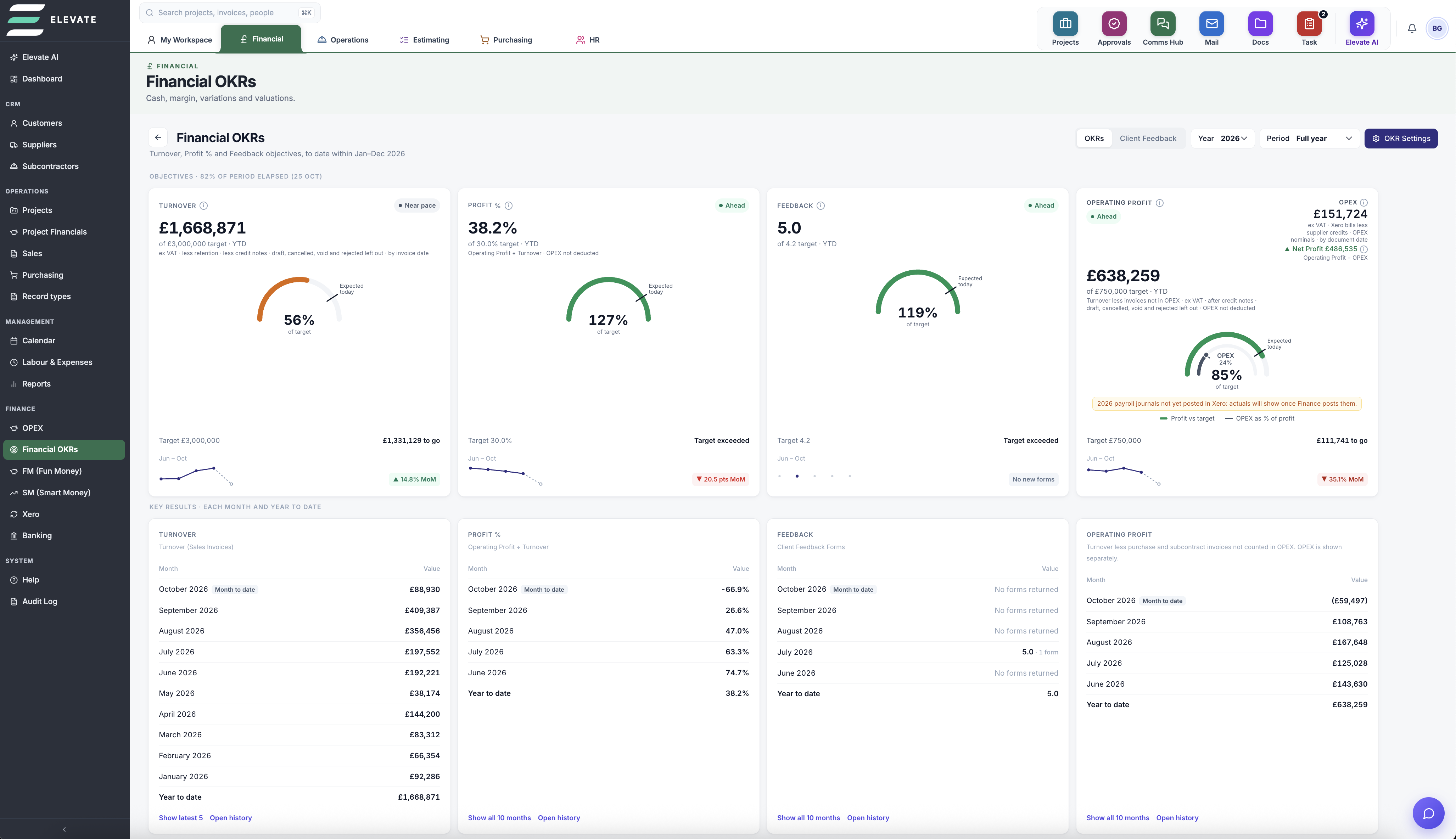
Set company targets, initiatives and financial goals, then log key results to track progress against your main financial objectives. See if your profit is really covering your expenses, using live figures from Xero.
Company Targets
Set yearly targets and initiatives for turnover, profit %, feedback and operating profit.
Key Results
Record key results month by month and year to date, measured against your main financial objectives.
OPEX vs Operating Profit
See how your operating expenses compare with your operating profit, so you know if profit really covers your costs.
Pulled From Xero
Non-project costs come straight from your Xero records, giving you a full financial performance page.
Project
Programmes
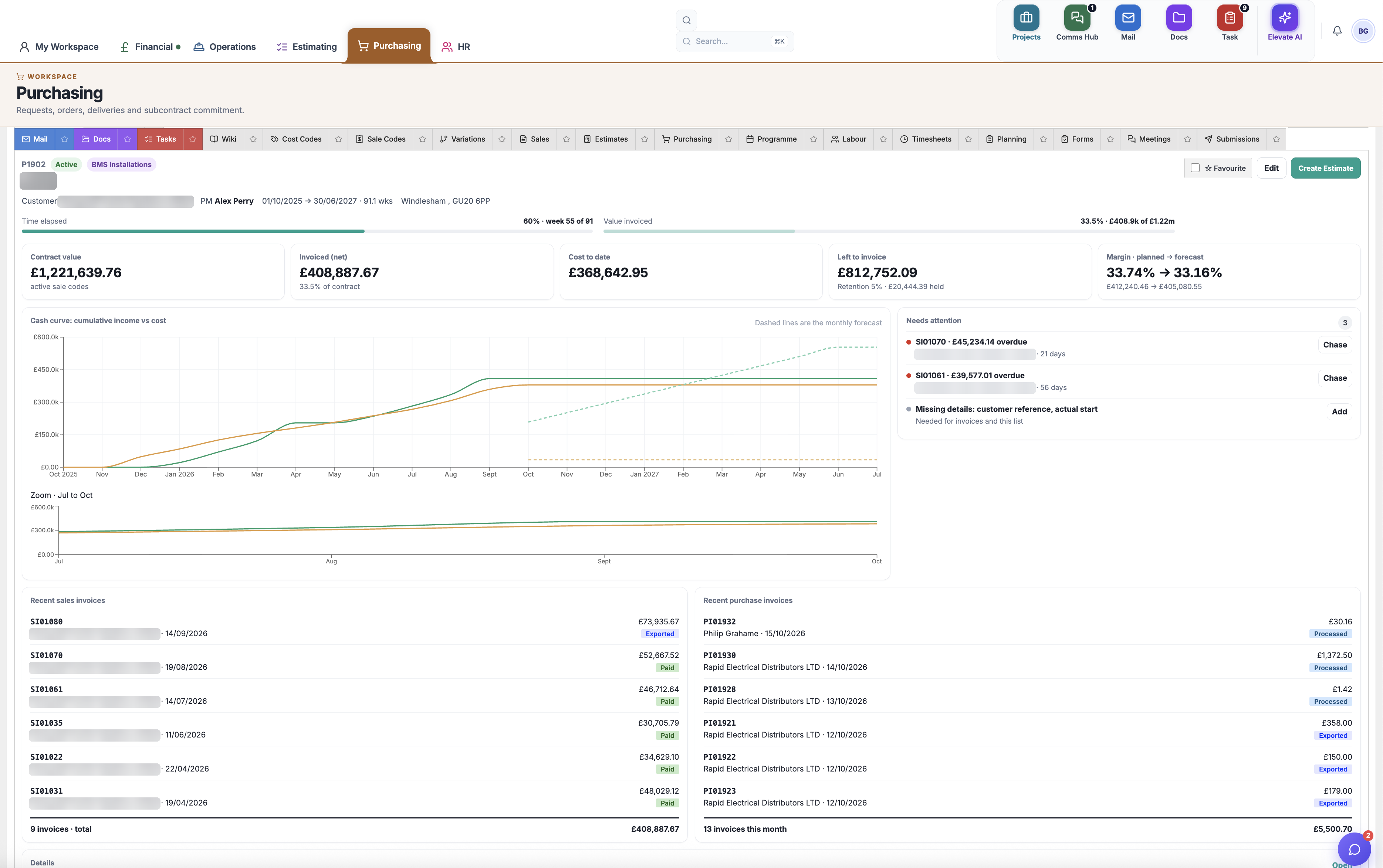
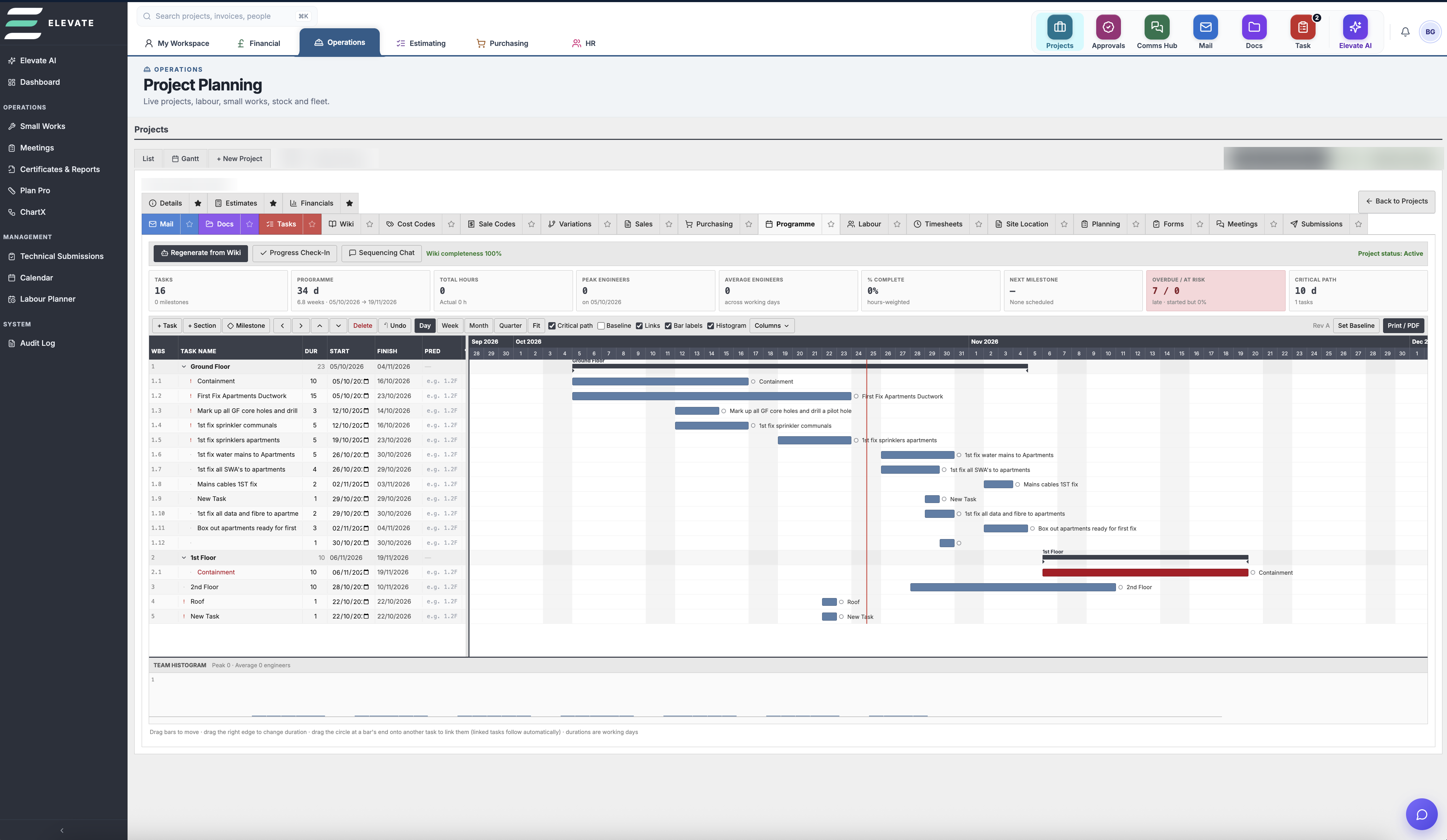
Build your project programmes in a full Gantt chart tool, right inside each project. You don't need separate planning software: your programme sits next to your labour, purchasing and financials.
Drag-and-Drop Gantt
Build tasks, sections and milestones, then drag bars to move or resize them. Linked tasks follow automatically.
Critical Path & Baselines
See the critical path, set baselines and track progress, overdue tasks and the next milestone at a glance.
Labour Histogram
Plan engineer numbers across the programme with a built-in team histogram, then print or export to PDF.
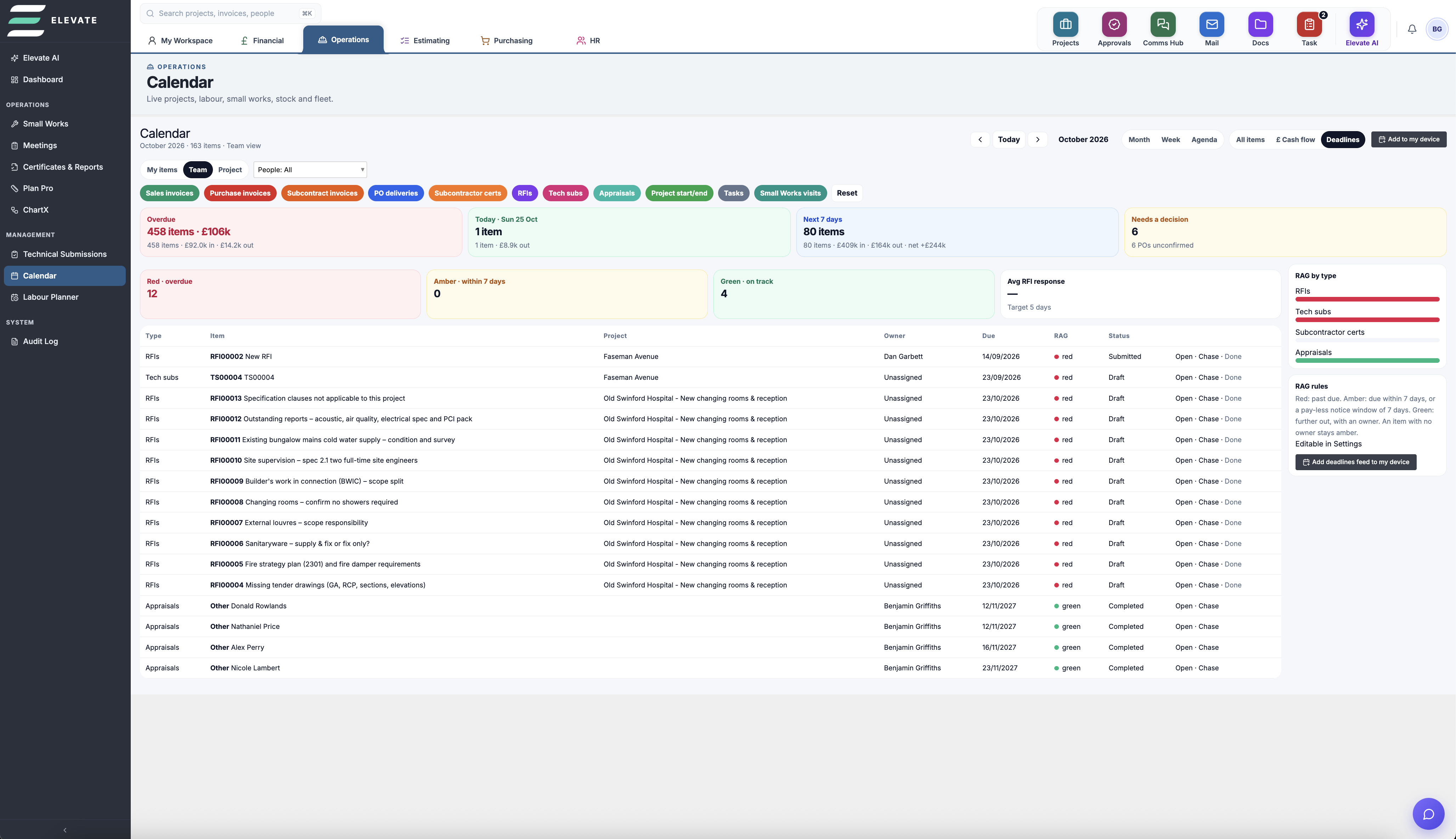
Calendar &
Deadline Tracking
Track every deadline in one place, from RFIs and technical submissions to appraisals and project milestones. Get full insight into payments due, with sales, purchase and subcontract invoices laid out by day so you always know what's going out and coming in.
Labour
Planner
Plan your workforce with confidence. Allocate engineers, catch clashes, see leave days while you plan and spot pinch points before they hit your programme.
Allocate Engineers
Assign engineers to projects and jobs across the week in a few clicks.
Spot Clashes
See double-bookings straight away, before they cause problems on site.
Leave Built In
Approved leave days show while you plan, so nobody is booked when they're off.
Understand Pinch Points
See where you're short of labour so you can plan ahead or bring in subcontractors.
Team
Map
See where every project is and who is on site right now. Engineers clock in and out with the mobile app, and each project's geofence makes sure they are actually on site when they do.
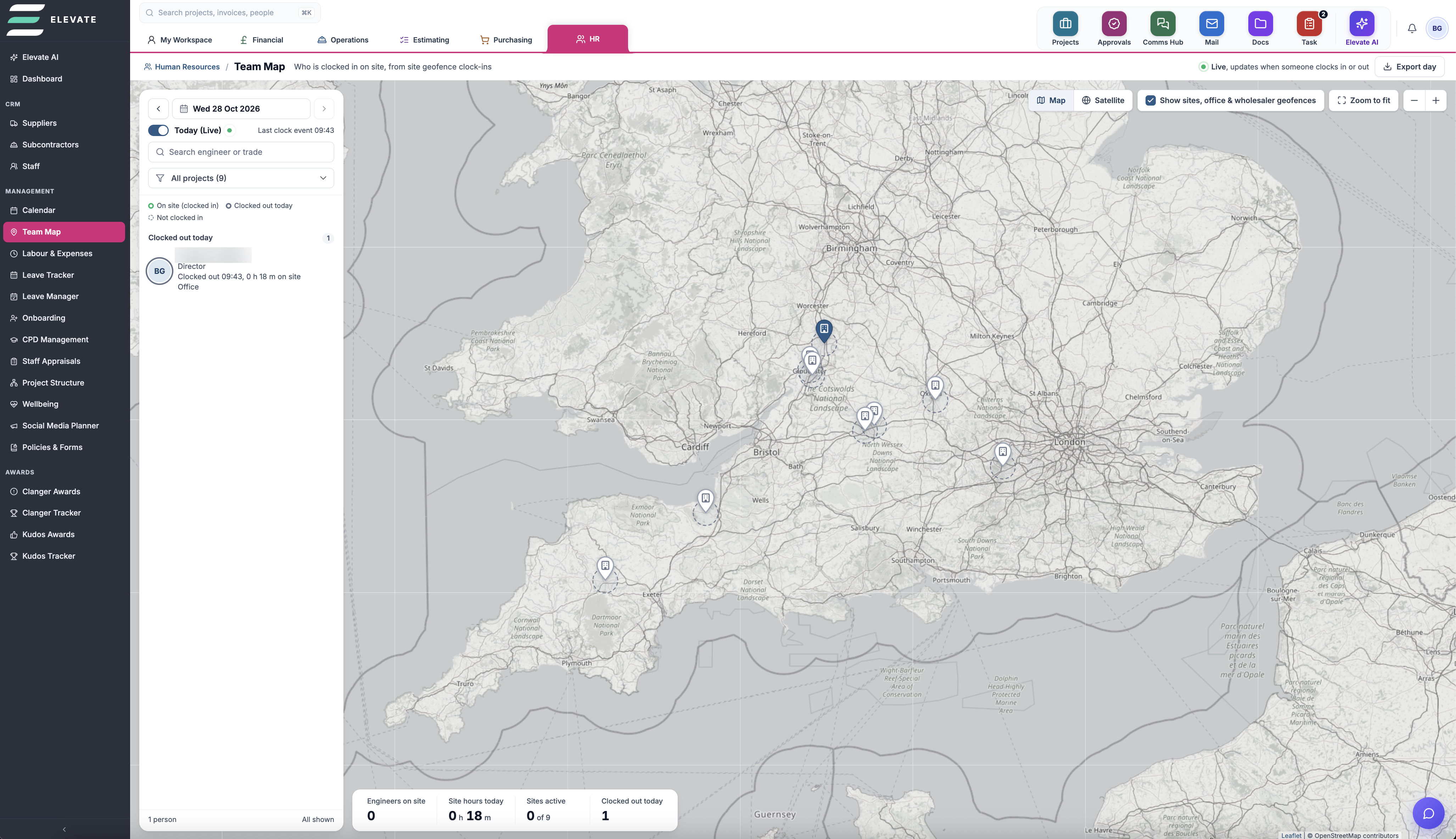
Every Project on One Map
See all your live sites, your office and wholesalers plotted across the country, with a quick zoom to fit.
Live Clock-Ins
Watch engineers clock in and out from the mobile app in real time, with site hours and who is on site today.
Geofenced Sites
Each project has its own geofence. Engineers must be inside it to clock in or out, so timesheets match where they really were.
Plan Pro
Take off from drawings without the clutter. Strip back walls and distractions, count symbols fast, mock up drawings for issue, and push it all straight into your estimate.
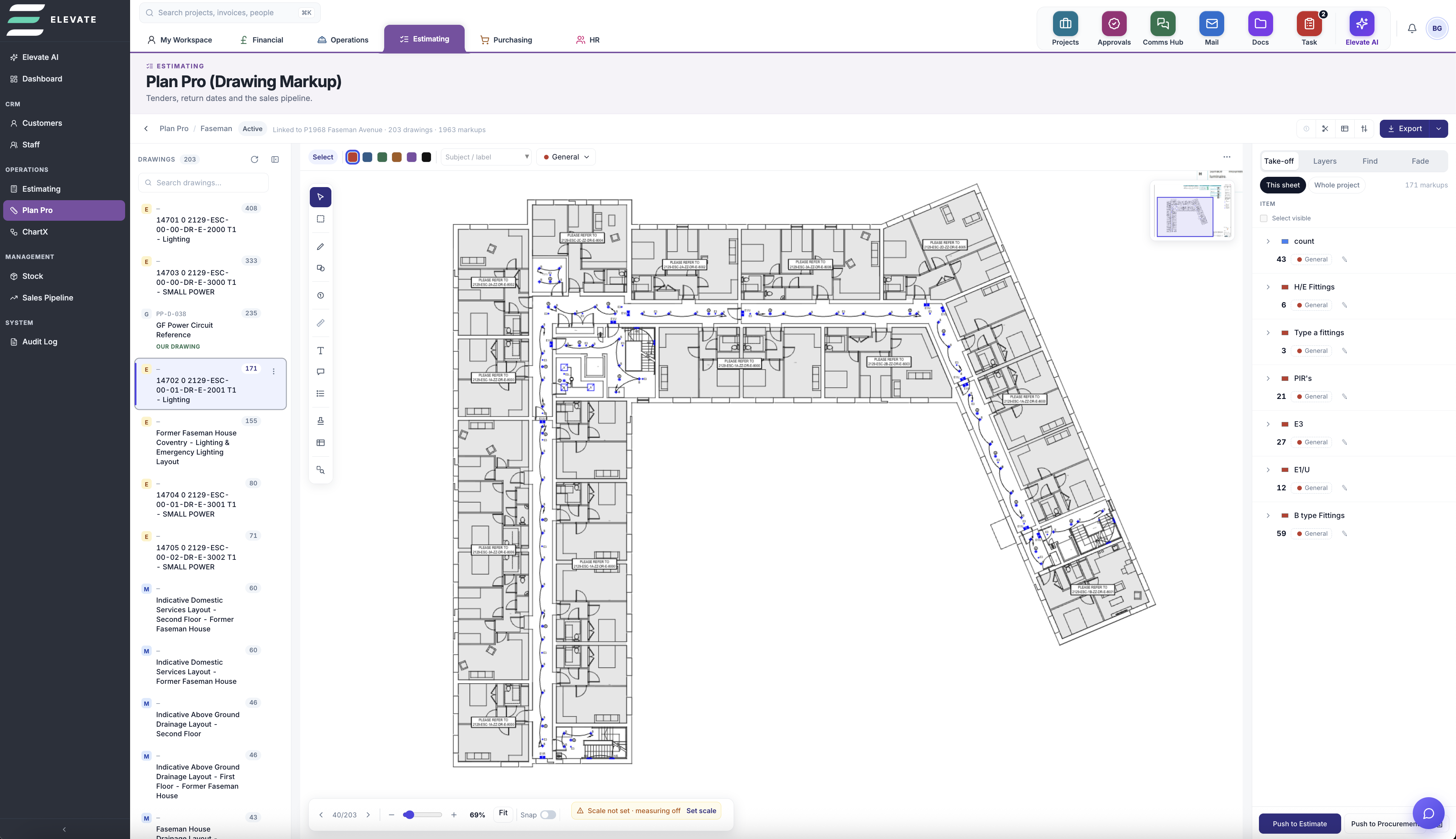
Fade out the noise
Dim or hide walls, grids and building layers so symbols stand out and are easy to count.
Search & count
Find matching symbols across a sheet or the whole project and count them in seconds.
Symbol library
UK electrical & mechanical symbols, plus your own custom symbols, to mock up drawings for issue.
Your branding
Insert your logo, drawing title block and legends for professional issued drawings.
Push to estimate
Send every take-off list straight into a working estimate, or on to procurement.
Purchasing
Run every purchase from the first request on site to the final supplier invoice, without leaving Elevate.
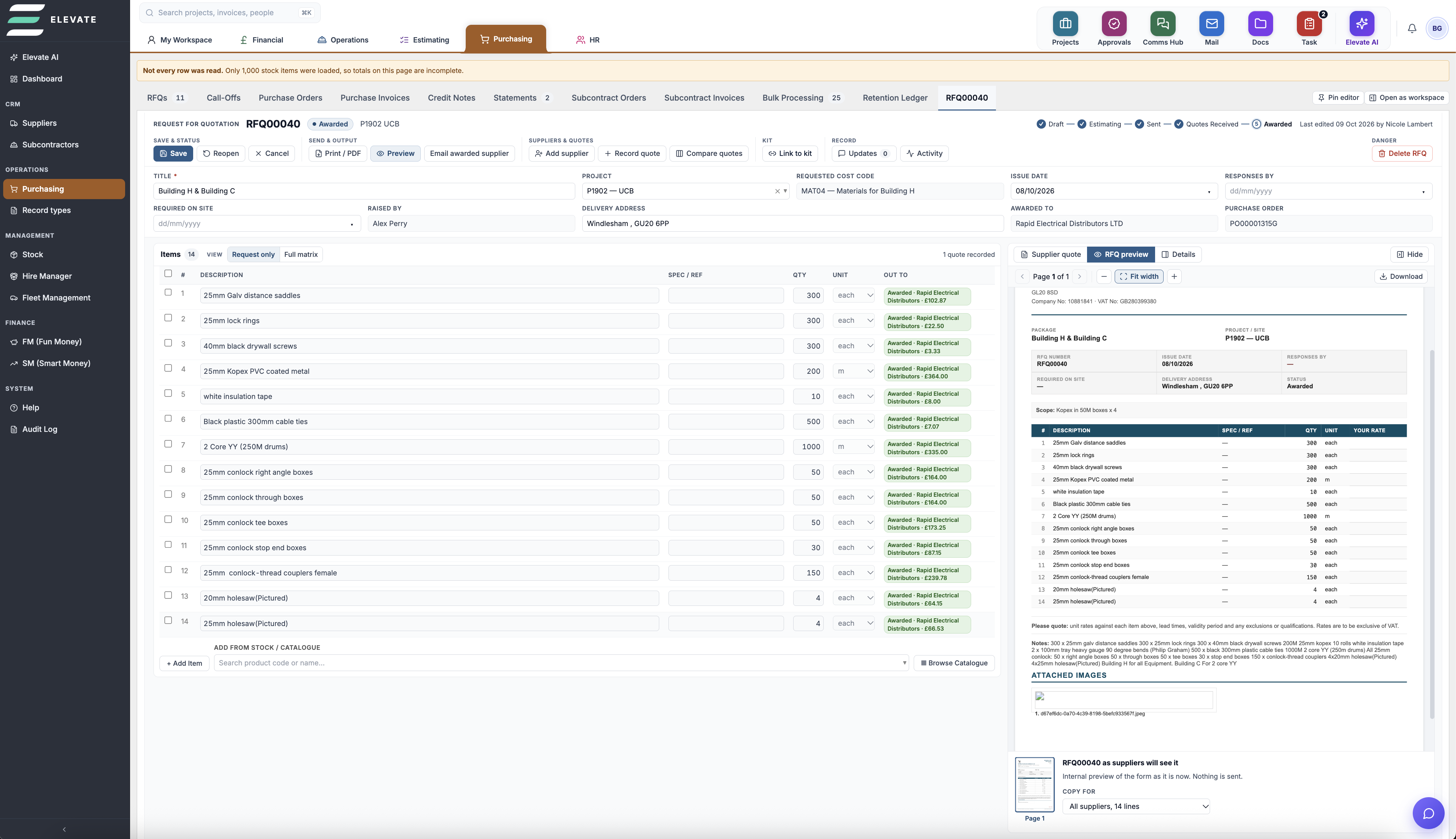
Requests to RFQs
Project managers and supervisors raise requests that instantly message your buyer, who turns them into an RFQ.
Compare Supplier Pricing
Issue one RFQ to several suppliers, compare best prices, then split orders by line or award the whole list to one supplier.
Costs to Budgets
Every order is allocated to the project and its cost codes, so budgets update as you buy.
Never Leave Elevate
From request to supplier quotes, ordering and invoicing. Generated, emailed and processed in one place, with no downloads.
Policies
& Forms
Update all your company policies, insurance and accreditations in one place. Monitor expiry dates and send documents to your team for e-signature, all in Elevate.
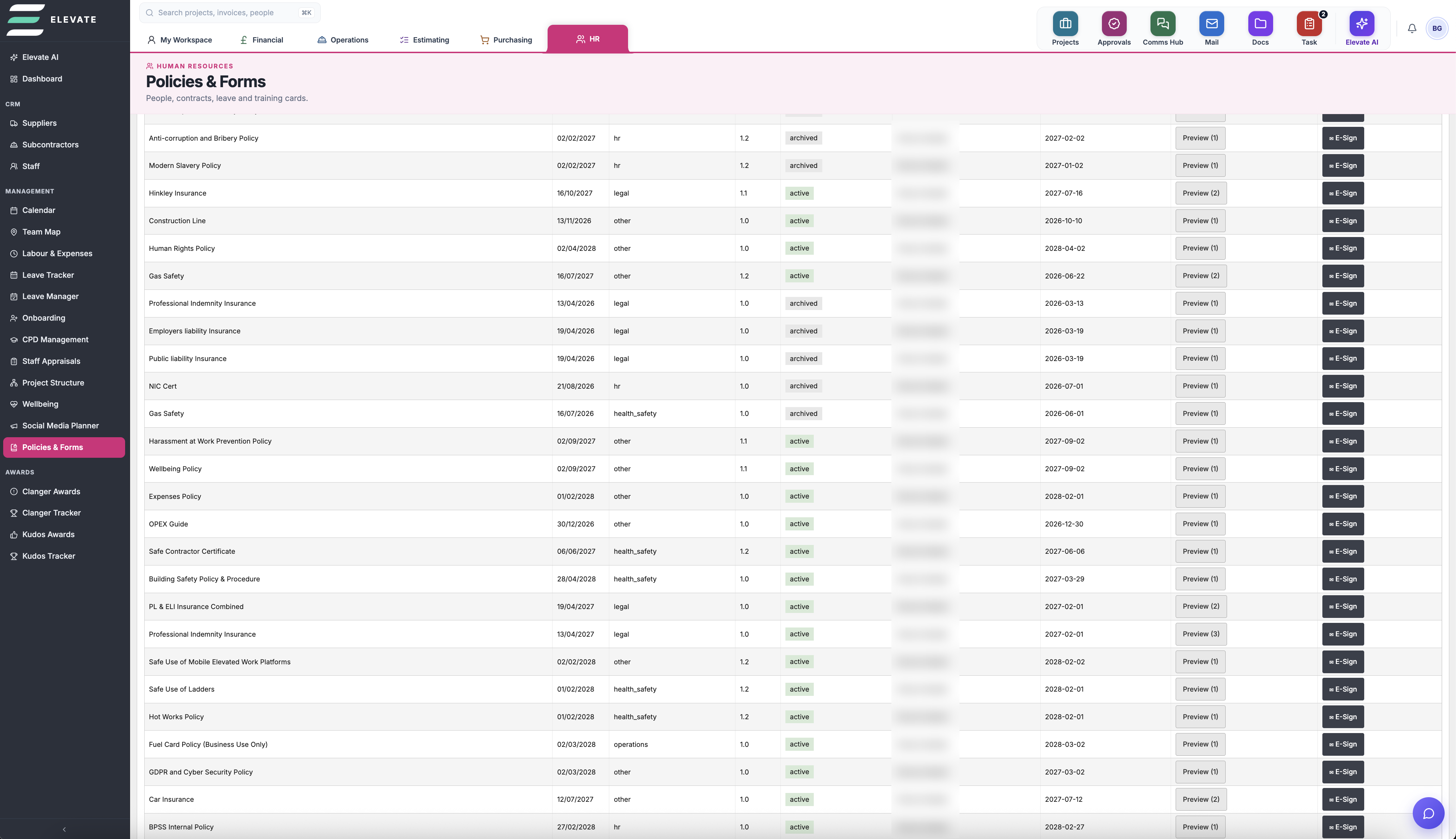
One Policy Register
Keep insurance, accreditations and company policies together, with versions, categories and status in one list.
Expiry Monitoring
Track every renewal date so insurance and accreditations never lapse without you knowing.
E-Signatures
Send policies to team members for e-signature and see who has signed, all inside Elevate.
Inventory
Management
Add products, track stock with QR codes and map supplier prices. Then use them in the estimating suite or build them into assemblies.
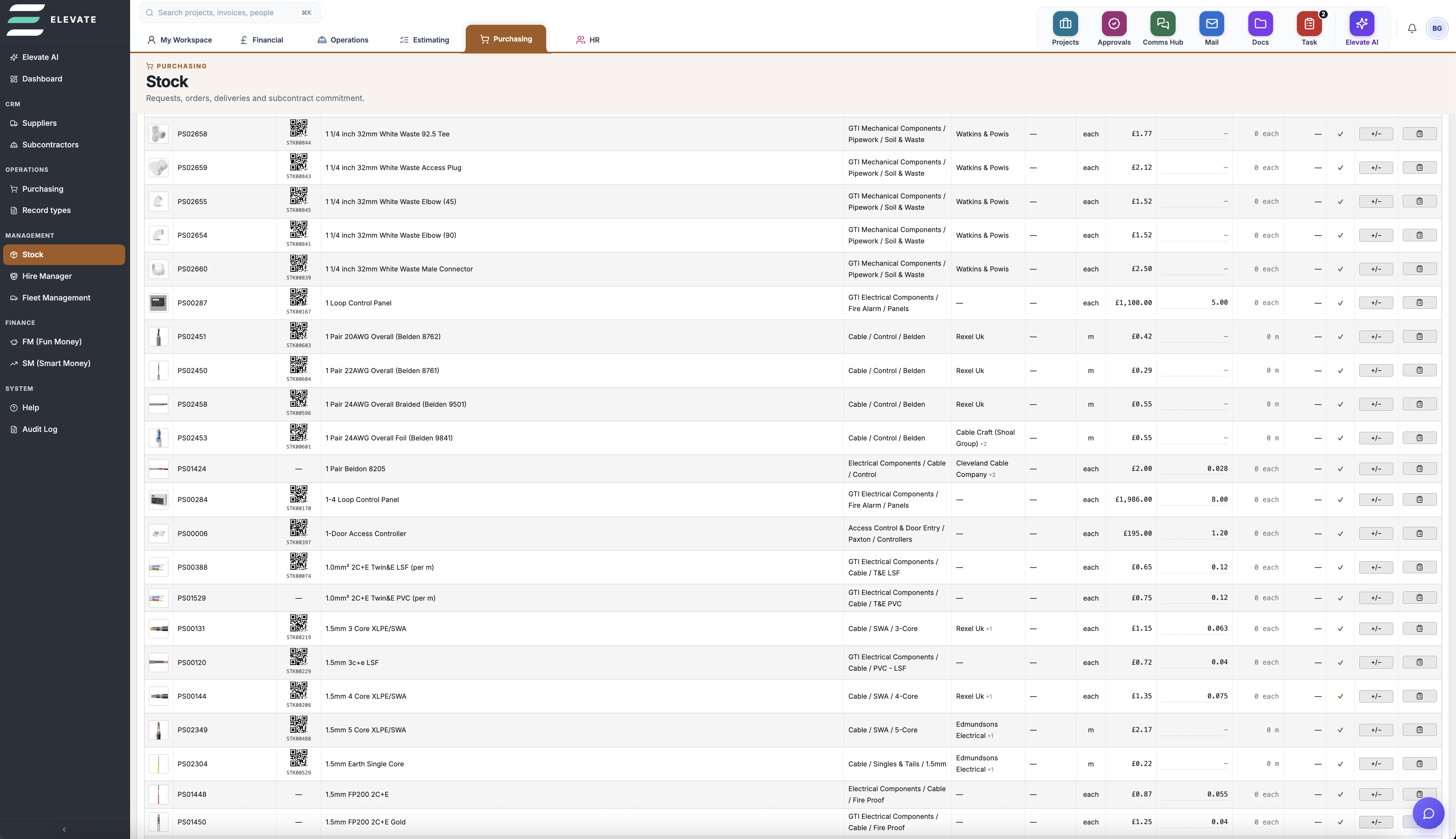
Add New Products
Build your own catalogue with codes, images, categories, costs and labour times.
Track Stock Levels
Stock on hand, reorder levels and locations, so you know what's in the van or the yard.
QR Codes
Every item gets a QR code. Print labels and scan to find products in seconds.
Supplier Price Mapping
Map each product to several suppliers, with their codes, prices, pack sizes and lead times.
Estimating Ready
Pull products straight into estimates, with materials and labour priced for you.
Building Assemblies
Group items into reusable kits with total materials, labour hours and sell price.
Email
Client
Connect Microsoft 365 and manage your emails inside Elevate. File them to projects so every project has its own mail history, and send attachments straight into your documents.
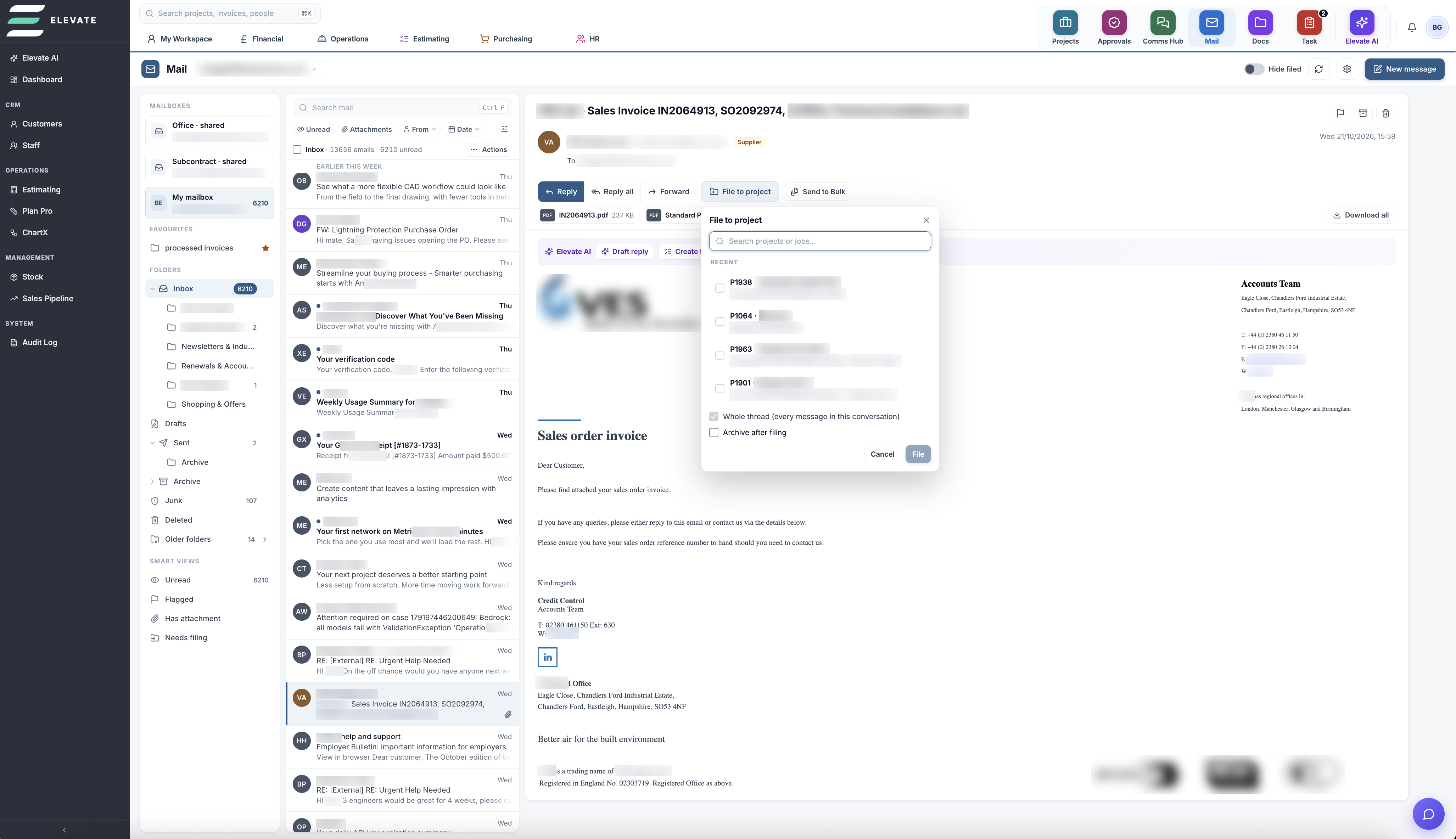
Microsoft 365 Connected
Your shared and personal mailboxes, all inside Elevate.
File to Projects
Assign emails or whole threads to a project in a couple of clicks.
Project Mail Pages
Every project has its own mail page, so the whole team stays up to date.
Attachments to Documents
Push attachments straight into document management and index them. No more lost documents.
Document
Management
Where all your business documents live. Access-controlled, neatly filed and fully indexed, with a mark-up tool and Elevate AI that can read and recall everything.
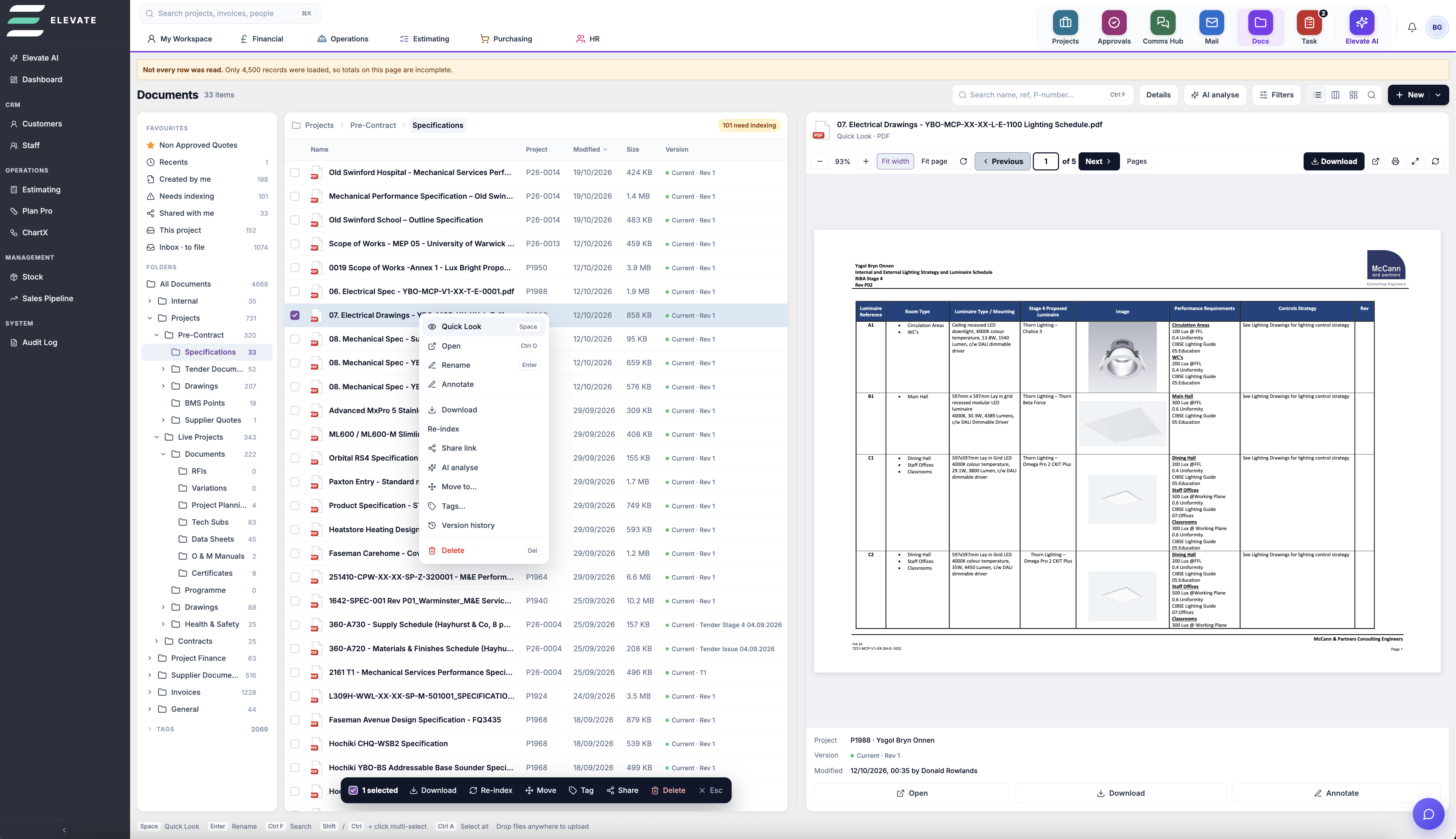
One Home for Documents
Every document in your business, in one place.
Access Controlled
Logins and permissions decide who can see and edit what.
Standard Folders
Ready-made folder setups for every project, which you can customise.
Full Indexing
Index by project, folder, type and version, so everything is easy to find.
Annotation Tool
Mark up drawings and documents with pens, shapes, arrows and text.
Elevate AI
AI reads your documents, recalls information when you need it and checks specifications.
Win the work
Opportunities & pipeline
Log every enquiry with its value, client and stage, see the pipeline at a glance, and know which tenders are due back.
Estimating
Build estimates by cost code from labour, materials, plant, subcontract, preliminaries and overheads. Apply wastage, inflation and risk percentages, and see margin and markup as you go. Revisions are kept.
Tender issue & quotations
Produce tender issue forms and numbered quotations from the estimate.
Product & price library
Your own catalogue of materials, assemblies and supplier prices, used directly in estimates.
Drawing markups (PlanPro)
Mark up PDF drawings within the project.
Deliver the job
Projects & cost codes
Each project gets its own budget, broken down by cost codes by trade or package, with PO values, labour, stock and remaining budget shown live and overspend flagged.
Programme
Plan tasks against the programme, with working-week settings.
RFIs & technical submissions
Raise and track RFIs, and build technical submissions. Datasheets are read automatically to save typing.
Certificates tracker
List every certificate the job needs by area (for example "Electrical certificate: EV chargers"), and track it from required to uploaded to retest. Handover stops being a scramble.
O&M manuals
Assemble O&M content per project.
Site photos
Photos filed against the project from the mobile app.
Risk register
Project risks with owners, mitigation and status.
Buy & subcontract
RFQs
Send requests for quotation, log supplier quotes, and compare them.
Purchase orders
Raise POs against cost codes, and match purchase invoices to them.
Procurement kits
Reusable kits of materials for repeat installs.
Subcontract orders & invoices
Issue orders, receive subcontract invoices against them, and apply CIS deductions.
Supplier & subcontractor reviews
Score quality, timeliness, communication, H&S, invoice accuracy and value (1–5), linked to the project.
Get paid
Applications for payment
Build monthly applications against the contract value and approved variations, and track them from created to issued to paid.
Variations
Record each instruction with its value and status, and pull approved variations into the next application.
Retentions
Track retention held on every project so release dates aren't forgotten.
Sales, purchase & subcontract invoices
One ledger tied to projects, with two-way Xero or QuickBooks sync.
Financial dashboard
Outstanding and overdue, sales ageing, forecast vs invoiced, retentions, and the applications and variations queue.
Cashflow forecast
A daily view of money in and out by due date, including payroll and overheads.
Small works
Small works jobs & visits
Reactive and small works logged with their visits, separate from main contracts.
People & compliance
Timesheets
Engineers book time to projects on mobile, and managers approve it.
Leave
Allowances, a team calendar, and approvals.
CPD & qualifications
Courses and cards for staff and subcontractors, with expiry alerts at 60, 30 and 7 days.
Appraisals
Structured reviews and actions.
Policies
Policy documents with staff acknowledgement.
Onboarding
Digital onboarding forms for new starters and subcontractors.
Fleet
Vehicles with MOT, service and document reminders.
Mobile app
Mobile app
Clock in, jobs, timesheets, photos, materials, document scan, chat, expenses and tasks, all from one home screen.
Communication & AI
Comms Hub
Staff chat and private threads.
Project mail
Emails linked and copied into the project's mail page.
AI assistant
Ask questions of live data ("what's overdue on P1968?"), get drafts, summaries and task follow-ups, and drafts chasers for RFQs, quotes and invoices for you to approve.
E-signature
Send documents for signature from Elevate.
Forecasting
Scheduled project forecast runs.
Document builder & storage
Document builder & storage
Project-linked documents with automatic filing (for example, subcontract invoices filed under Invoices).